2023లో ఉన్న టాప్ 5 ఇమేజ్ నుండి టెక్స్ట్ AI టూల్స్
నవీకరించబడింది 30 జులై 2025
6 నిమిషాలు
మీరు చిత్రాల నుండి టెక్స్ట్ను మాన్యువల్గా టైప్ చేయడం వల్ల అలసిపోయారా? అయితే, మీకు అదృష్టం! ఆర్టిఫిషియల్ ఇంటెలిజెన్స్ (AI) లో జరిగిన పురోగతుల కారణంగా, చిత్రాలను టెక్స్ట్గా త్వరగా మరియు సులభంగా మార్చడంలో మీకు సహాయపడగల కొన్ని శక్తివంతమైన టూల్స్ అందుబాటులో ఉన్నాయి.
ఈ వ్యాసం 2023లో అందుబాటులో ఉన్న టాప్ 5 ఉత్తమ ఇమేజ్-టు-టెక్స్ట్ AI టూల్స్ ను మీకు పరిచయం చేస్తుంది. Sider నుండి ChatGPT, OCR.best, Nanonet, మరియు IMG2TXT వరకు, ఈ టూల్స్ ప్రతి ఒక్కటి ప్రత్యేకంగా ఏమిటి మరియు ఎందుకు పరిగణించాల్సినవి అనేది మేము మరింత లోతుగా చూడబోతున్నాము.
AI ఆధారిత ఇమేజ్ నుండి టెక్స్ట్ మార్చే సాధనం అంటే ఏమిటి?
AI ఆధారిత ఇమేజ్-టు-టెక్స్ట్ కన్వర్టర్ అనేది చిత్రాలలో ఉన్న టెక్స్ట్ను విశ్లేషించడానికి మరియు గుర్తించడానికి ఆర్టిఫిషియల్ ఇంటెలిజెన్స్ అల్గోరిథమ్స్ను ఉపయోగించే సాఫ్ట్వేర్. ఈ టూల్స్ సరిగ్గా చిత్రాలను సవరించగల టెక్స్ట్గా మార్చడానికి ఆధునిక ఆప్టికల్ క్యారెక్టర్ రికగ్నిషన్ (OCR) టెక్నాలజీని ఉపయోగిస్తాయి. యంత్రం నేర్చుకోవడం మరియు డీప్ లెర్నింగ్ మోడల్స్ను ఉపయోగించి, ఈ AI టూల్స్ వివిధ రకాల చిత్రాల నుండి టెక్స్ట్ను అర్థం చేసుకోవడంలో మరియు తీసుకోవడంలో సహాయపడతాయి, అందులో స్కాన్ చేసిన డాక్యుమెంట్లు, ఫోటోలు, స్క్రీన్షాట్లు మరియు చేతితో రాసిన నోట్స్ కూడా ఉన్నాయి.
టాప్ 5 ఉత్తమ ఇమేజ్-టు-టెక్స్ట్ AI టూల్స్
1. Sider
Sider అన్ని వినియోగదారులకు ఇమేజ్-టు-టెక్స్ట్ చాట్ ఫీచర్ను అందించే మొదటి AI టూల్. ఇది చిత్రాల నుండి టెక్స్ట్ను తీసుకోవచ్చు మరియు ChatGPT కు పంపవచ్చు, ఏదైనా చిత్రాన్ని వర్ణించగలదు, మరియు మరింత! ఈ శక్తివంతమైన టూల్ సరిగ్గా చిత్రాల నుండి టెక్స్ట్ను గుర్తించడానికి మరియు తీసుకోవడానికి ఆధునిక OCR (ఆప్టికల్ క్యారెక్టర్ రికగ్నిషన్) టెక్నాలజీని ఉపయోగిస్తుంది, ఇది చిత్రాలను సవరించగల టెక్స్ట్ ఫైళ్లలో మార్చడం సులభం చేస్తుంది.
Sider తో, మీరు JPEG, PNG వంటి వివిధ ఫార్మాట్లలో చిత్రాలను అప్లోడ్ చేయవచ్చు. అప్లోడ్ చేసిన తర్వాత, Sider ఆ చిత్రాన్ని స్వయంచాలకంగా విశ్లేషించి, దానిలో ఉన్న టెక్స్ట్ను తీసుకుంటుంది. మీరు తీసుకున్న టెక్స్ట్ను కాపీ చేసుకోవచ్చు, దానికి ఆధారంగా సంభాషణను ప్రారంభించవచ్చు లేదా దాన్ని అనేక భాషలలో అనువదించవచ్చు.
ప్రయోజనాలు:
- సులభమైన మరియు వేగవంతమైన OCR
- ఏదైనా చిత్రాన్ని వర్ణించడంలో మరియు దాని పట్ల చాట్ చేయడంలో సహాయపడుతుంది
- చిత్రాల నుండి టెక్స్ట్, సంఖ్యలు మరియు సమీకరణాలను తీసుకుంటుంది
- చాలా విలువైన ఫీచర్లను అందిస్తుంది
తక్కువలు:
- ఇంగ్లీష్లో మాత్రమే చేతి రాతను గుర్తించగలదు
Sider తో చిత్రాన్ని టెక్స్ట్గా మార్చడం చాలా సరళం. దిగువ దశలను చూడండి.
దశ 1. Sider ఎక్స్టెన్షన్ను మీ కంప్యూటర్లో డౌన్లోడ్ చేసి ఇన్స్టాల్ చేయండి. దానిలో లాగిన్ అవ్వండి లేదా ఖాతాను సృష్టించండి.
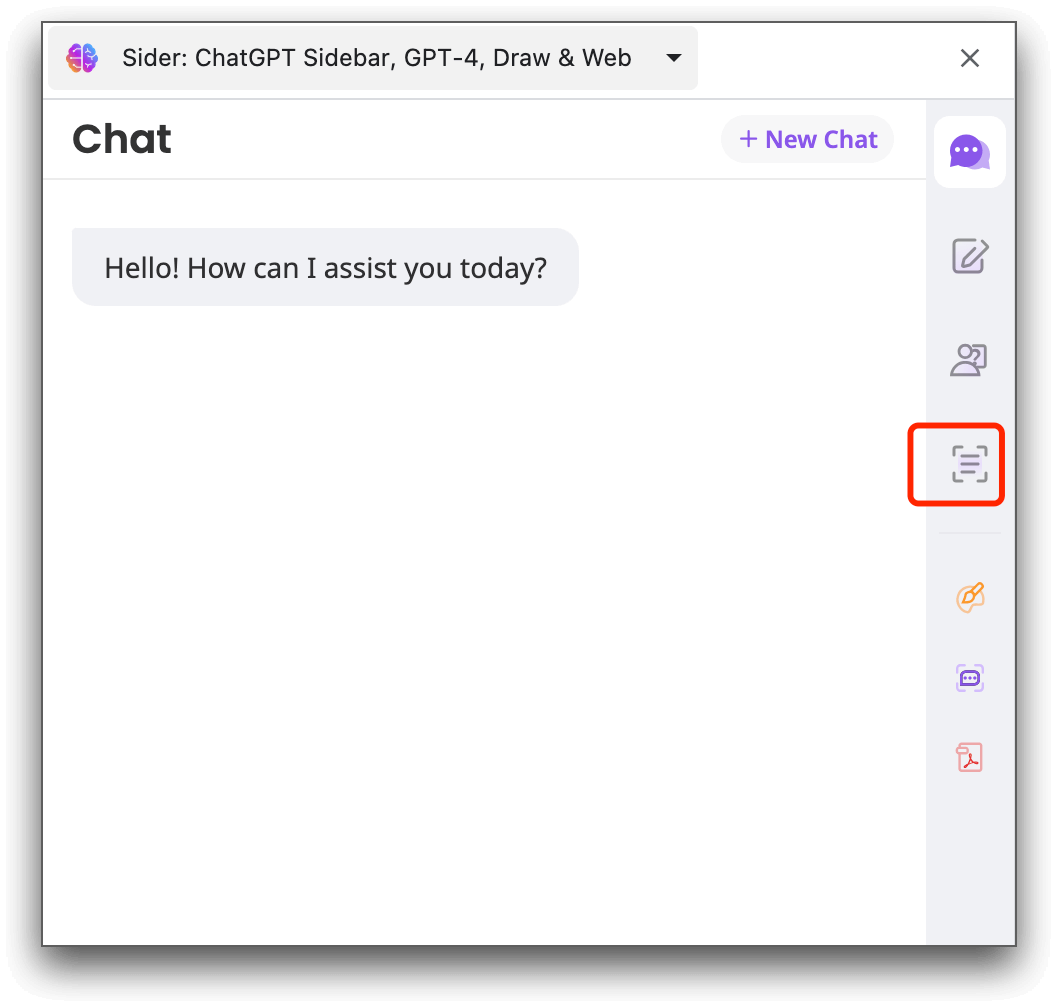
దశ 2. ఎక్స్టెన్షన్ బార్లో Sider ఐకాన్పై క్లిక్ చేసి సైడ్బార్ను ప్రారంభించండి. సైడ్బార్ యొక్క కుడి వైపు “OCR” ఐకాన్ను నొక్కండి.
దశ 3. మీరు టెక్స్ట్ను తీసుకోవాలనుకునే చిత్రాన్ని అప్లోడ్ చేయండి. లేదా మీరు స్క్రీన్షాట్ తీసుకుని Sider దానిలోని టెక్స్ట్ను తీసుకోవడానికి అనుమతించవచ్చు.
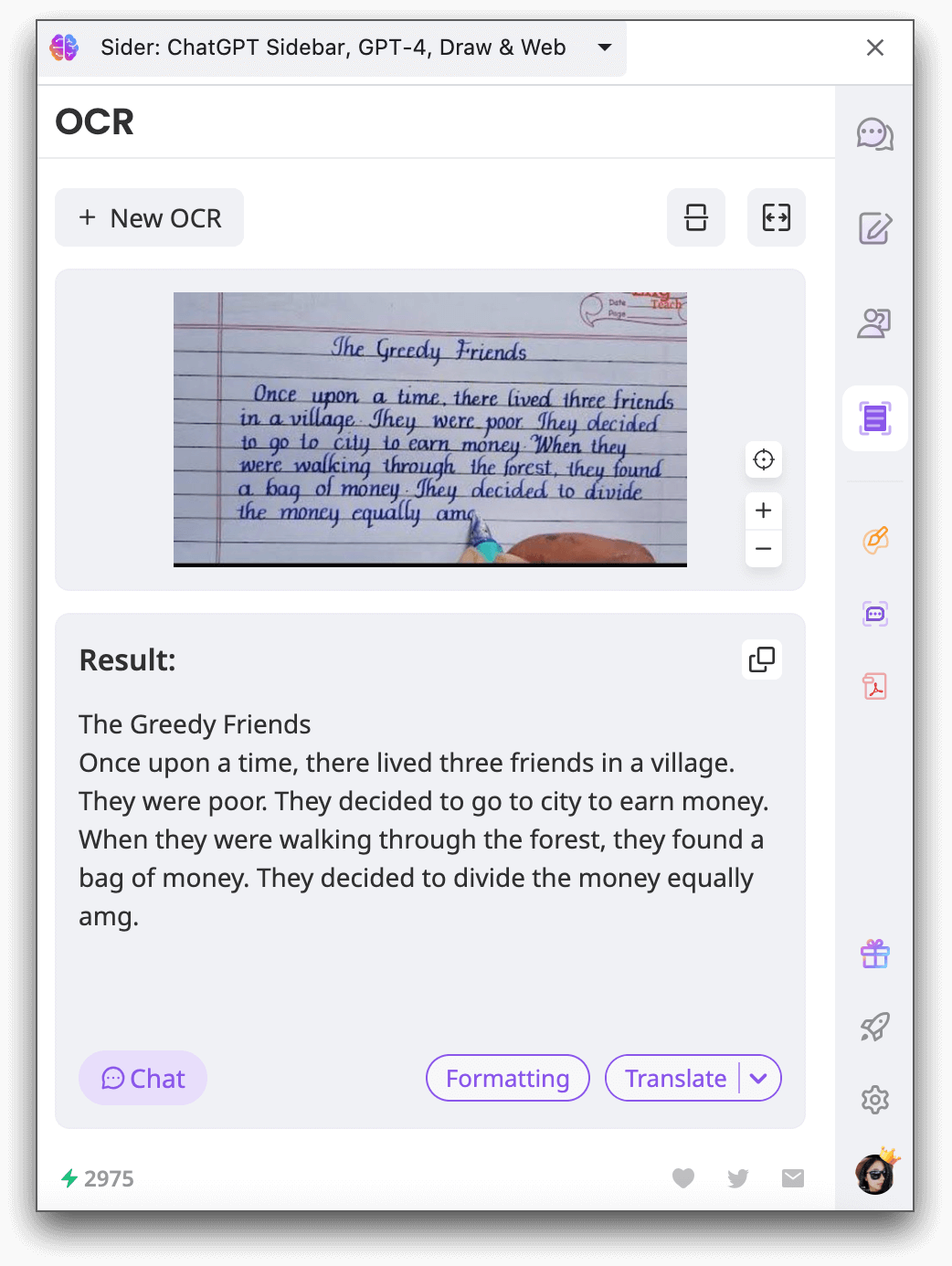
దశ 4. తీసుకోవడం పూర్తయిన తర్వాత, మీరు తీసుకున్న టెక్స్ట్ను కాపీ చేసుకోవచ్చు, దానికి ఆధారంగా చాట్ను ప్రారంభించవచ్చు లేదా తదుపరి ఉపయోగానికి దానిని అనువదించవచ్చు.
2. ChatGPT
ChatGPT, OpenAI ద్వారా అభివృద్ధి చేయబడింది, ఇది దాని సహజ భాషా ప్రాసెసింగ్ సామర్థ్యాల కోసం ప్రసిద్ధి చెందింది. ప్రధానంగా సంభాషణ AI సాధనంగా తెలిసిన ChatGPT, Plus సభ్యులకు చిత్రం-టెక్స్ట్ మార్పిడి కోసం మద్దతు ఇస్తుంది. ఈ సాధనం సహజ భాషా ప్రాసెసింగ్ (NLP) మరియు కంప్యూటర్ విజన్ సాంకేతికత యొక్క సంయోజనాన్ని ఉపయోగించి చిత్రాల నుండి టెక్స్ట్ను ఖచ్చితంగా గుర్తించి తీసుకుంటుంది.
దాని బహుముఖత మరియు నమ్మకంతో, ChatGPT టెక్స్ట్ మరియు చిత్రం ప్రాసెసింగ్లో అత్యుత్తమంగా ఉన్న AI సాధనాన్ని కోరుకునే వారికి టాప్ ఎంపికగా ఉంది. చిత్రం-టెక్స్ట్ ఫీచర్ ఉచిత వినియోగదారులకు అందుబాటులో లేదు, కానీ Plus కు అప్గ్రేడ్ చేసుకుంటే vision ఫీచర్ను ఆస్వాదించవచ్చు.
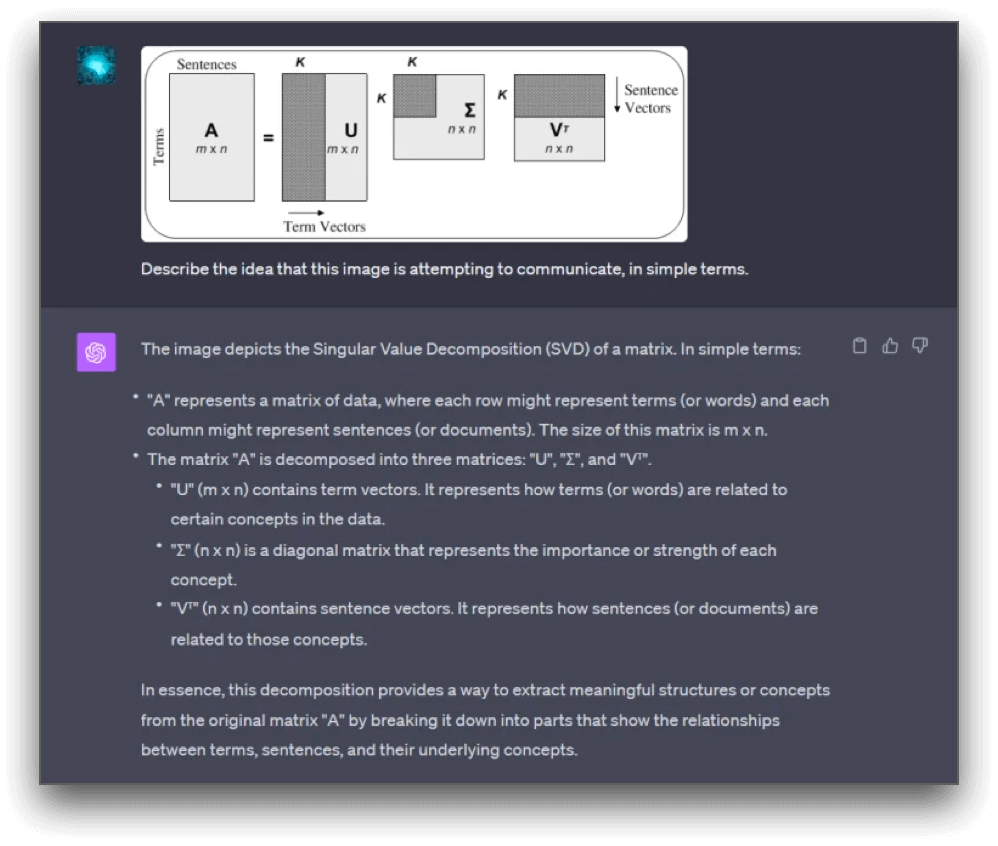
- చిత్రాలలో టెక్స్ట్ను ఖచ్చితంగా గుర్తిస్తుంది
- మానవ-సామాన్య ధోరణులతో చిత్రాలను వర్ణించగలదు
ప్రతికూలాలు:
- చిత్రాన్ని టెక్స్ట్గా మార్చే ఫీచర్ కేవలం Plus సభ్యుల కోసం అందుబాటులో ఉంది
3. OCR.best
OCR.best ఒక సమర్థవంతమైన మరియు వినియోగదారులకు స్నేహపూర్వకమైన OCR సాధనం, ఇది చిత్రాలను సవరించదగిన టెక్స్ట్గా మార్చడానికి AIను ఉపయోగిస్తుంది, ఇది అత్యంత ఖచ్చితంగా ఉంటుంది. ఇది వివిధ చిత్ర ఫార్మాట్ల నుండి టెక్స్ట్ను తీసుకోవచ్చు, అందులో చేతితో రాసిన టెక్స్ట్ కూడా ఉంటది, ఎలాంటి తప్పులు లేకుండా. ఈ సాధనం భద్రతగా ఉంటుంది మరియు దాని సర్వర్లపై చిత్రం డేటాను నిల్వ చేయదు.
ఇది ఉచితంగా ఉపయోగించడానికి అందుబాటులో ఉంది మరియు తొమ్మిది చిత్రం ఫైల్ ఫార్మాట్లను మద్దతు ఇస్తుంది. అదనంగా, ఇది వివిధ భాషల మద్దతు అందిస్తుంది, అనుకూలత మరియు ఉత్తమ ఫలితాలను నిర్ధారిస్తుంది.
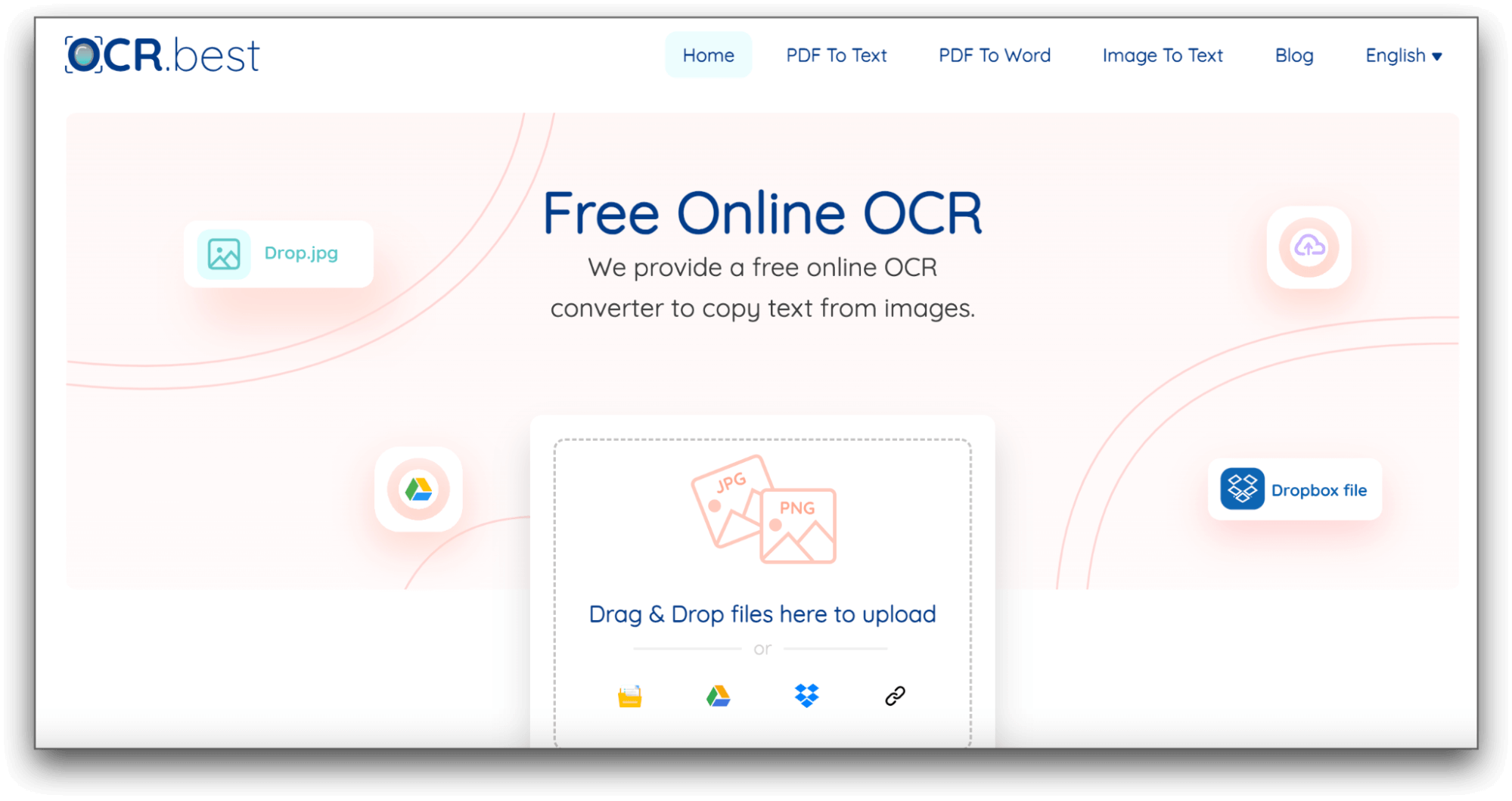
- ఉచితంగా ఉపయోగించడానికి, రోజువారీ పరిమితి లేదు
- స్కాన్ చేసిన పత్రాలు, తక్కువ-రెసొల్యూషన్ ఫోటోలు మరియు గణిత సమీకరణాలను కూడా టెక్స్ట్గా తీసుకుంటుంది
ప్రతికూలాలు:
- చిత్రాలను వర్ణించలేరు
- చిత్రాల ఆధారంగా AI చాట్ను మద్దతు ఇవ్వదు
4. Nanonets' Image to Text Converter
Nanonet చిత్రాల నుండి టెక్స్ట్ను తీసుకునే ఉచిత సాధనాన్ని అందిస్తుంది, ఇది 30 MB వరకు చిత్రాలను క్షణాల్లో ప్రాసెస్ చేయగలదు. ఈ సాధనం JPEG, PNG, మరియు PDF వంటి వివిధ ఫార్మాట్లను మద్దతు ఇస్తుంది. ఇది స్కాన్ చేసిన పత్రాలు, చేతితో రాసిన టెక్స్ట్ మొదలైనవి నిర్వహించగలదు. తీసుకున్న టెక్స్ట్ను టెక్స్ట్ ఫైల్గా డౌన్లోడ్ చేసుకోవచ్చు. అదనంగా, Nanonets ఉచిత Google Chrome విస్తరణను అందిస్తుంది.
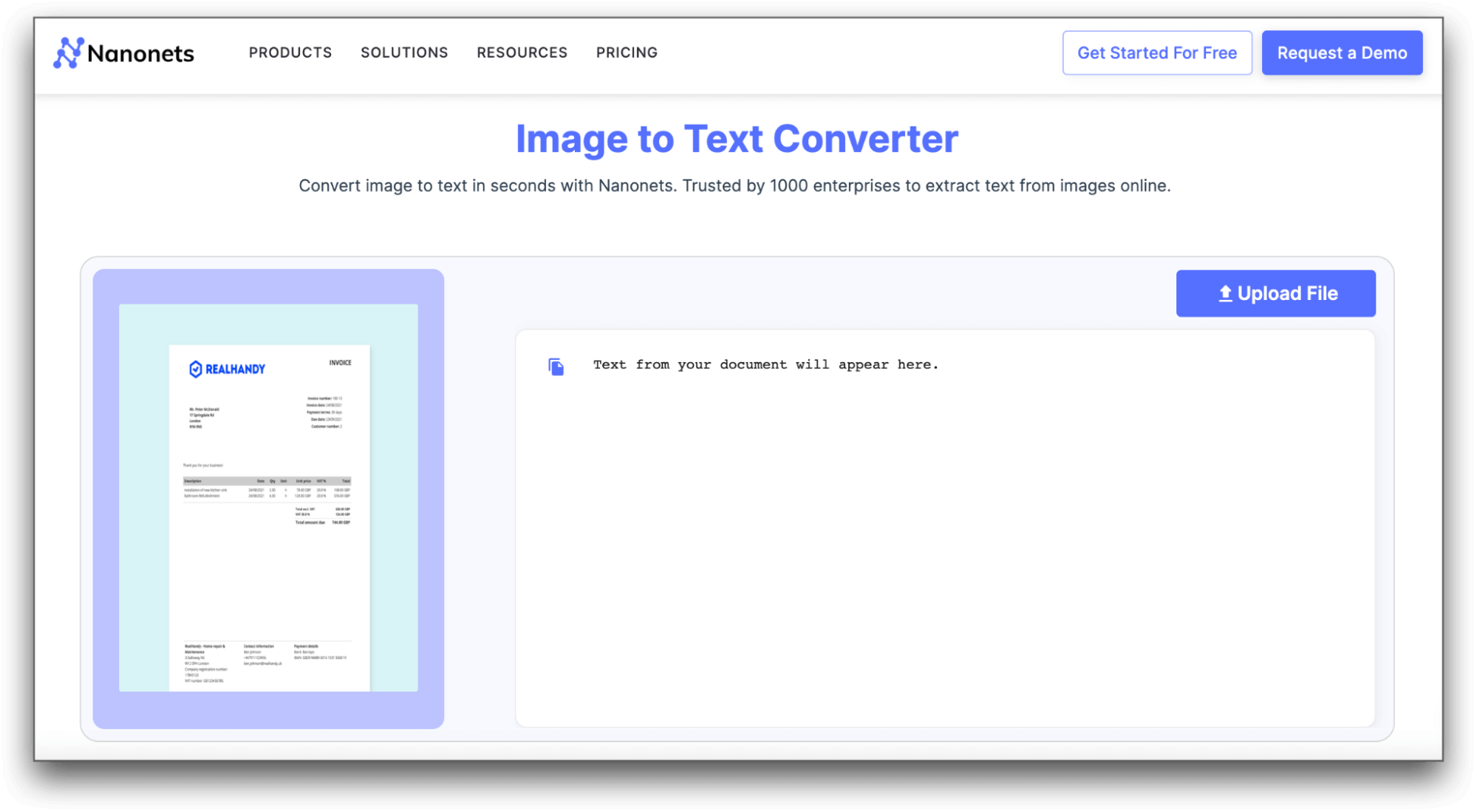
ప్రోస్:
- వినియోగానికి సులభం మరియు వేగంగా మార్పిడి
- వివిధ చిత్రం ఫార్మాట్లను మద్దతు ఇస్తుంది
ప్రతికూలాలు:
- చేతితో రాసిన టెక్స్ట్ను బాగా గుర్తించలేరు
5. IMG2TXT
IMG2TXT మరొక సులభమైన కానీ శక్తివంతమైన చిత్రం-టెక్స్ట్ AI సాధనం, ఇది ప్రాథమిక చిత్రం-టెక్స్ట్ మార్పిడి పనుల కోసం అనుకూలంగా ఉంది. దాని URL ఆధారిత చిత్రం-స్కానింగ్ సేవలు డిజిటల్ ఫైళ్లను మరియు ఫోటోలను సవరించదగిన టెక్స్ట్గా మార్చడానికి విలువైనవి. ఈ సాధనం ID కార్డులు, పాఠశాల రిపోర్ట్ కార్డులు, ఇన్ఫోగ్రాఫిక్స్, మరియు పోస్ట్కార్డ్ వంటి వివిధ చిత్రం ఫైళ్ల నుండి టెక్స్ట్ను త్వరగా గుర్తించగలదు.
ఇది 8MB కంటే తక్కువ చిత్ర ఫార్మాట్లను మద్దతు ఇస్తుంది మరియు 60 సెకన్లలో టెక్స్ట్ను తీసుకుంటుంది. Img2TXTని ప్రత్యేకంగా చేసే విషయం ఏమిటంటే, దాని విస్తృత భాషా ఎంపిక, ప్రపంచవ్యాప్తంగా మాట్లాడే ఎక్కువ మంది డయలెక్ట్స్ను కలిగి ఉంటుంది. వినియోగదారులు ఖచ్చితమైన ఫలితాల కోసం తమ ఇష్టమైన భాషను ఎంచుకోవచ్చు.
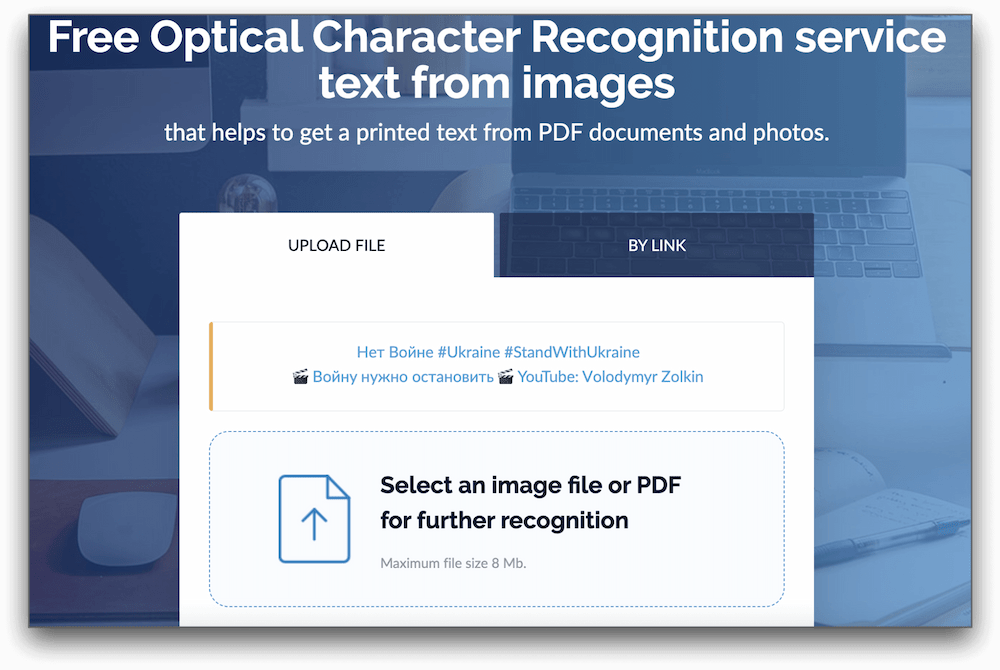
ప్రోస్:
- ఫైళ్ల/చిత్రాలను నేరుగా లేదా లింక్ ద్వారా అప్లోడ్ చేయడానికి అనుమతిస్తుంది
- jpg, jpeg, png, మరియు pdf వంటి బహుళ ఫార్మాట్లను మద్దతు ఇస్తుంది
- తీసుకున్న టెక్స్ట్ను txt, pdf, docx, మరియు odf కు ఎగుమతి చేయడానికి అనుమతిస్తుంది
- టెక్స్ట్ గుర్తింపుకు 35+ భాషలను మద్దతు ఇస్తుంది
ప్రతికూలాలు:
- చేతితో రాసిన టెక్స్ట్ను మద్దతు ఇవ్వదు
ముగింపు
2023లో, చిత్రం-టెక్స్ట్ AI సాధనాలు వ్యక్తులు మరియు సంస్థలకు అవసరమైనవి అయ్యాయి. ఈ వ్యాసంలో పేర్కొన్న టాప్ 5 సాధనాలు, Sider, ChatGPT, OCR.best, Nanonet, మరియు IMG2TXT, అసాధారణ ఖచ్చితత్వం, ఉపయోగంలో సులభత మరియు విస్తృతమైన లక్షణాలను అందిస్తాయి. AI శక్తిని ఆమోదించి, ఈ ఆధునిక చిత్రం-టెక్స్ట్ మార్పిడి సాధనాలను ఉపయోగించడం ద్వారా మీ పని ప్రవాహాన్ని సులభతరం చేయండి.
చిత్రం-టెక్స్ట్ AI గురించి FAQs
1. చిత్రాలను టెక్స్ట్గా మార్చే AI ఉందా?
అవును, చిత్రాలను సరిగ్గా సవరించగల editable textగా మార్చే అనేక AI ఆధారిత సాధనాలు అందుబాటులో ఉన్నాయి. ఈ సాధనాలు అధునాతన OCR సాంకేతికత మరియు గాఢమైన అభ్యాస నమూనాలను ఉపయోగించి చిత్రం టెక్స్ట్ను గుర్తించి, తీసుకుంటాయి.
2. చిత్రాన్ని టెక్స్ట్గా మార్చడానికి ఉత్తమ AI ఏది?
చిత్రం-టెక్స్ట్ మార్పిడి కోసం ఉత్తమ AI మీ ప్రత్యేక అవసరాలపై ఆధారపడి ఉంటుంది. అయితే, Sider, ChatGPT, OCR.best, Nanonet, మరియు IMG2TXT ఖచ్చితత్వం, ఉపయోగంలో సులభత మరియు అదనపు లక్షణాల పరంగా టాప్ పోటీదారులలో ఉన్నాయి.
3. ఆన్లైన్లో అత్యంత ఖచ్చితమైన చిత్రం-టెక్స్ట్ మార్పిడి సాధనం ఏది?
ఖచ్చితత్వం చిత్రం యొక్క సంక్లిష్టత మరియు టెక్స్ట్ యొక్క నాణ్యత ఆధారంగా మారవచ్చు, కానీ Sider చిత్రాన్ని టెక్స్ట్గా మార్చడంలో అసాధారణ ఖచ్చితత్వం కోసం ప్రసిద్ధి పొందింది.
4. నేను చిత్రాన్ని నిజమైన టెక్స్ట్గా ఎలా మార్చాలి?
చిత్రాన్ని నిజమైన టెక్స్ట్గా మార్చడానికి, మీరు Sider, ChatGPT, OCR.best, Nanonet, లేదా IMG2TXT వంటి చిత్రం-టెక్స్ట్ AI సాధనాన్ని ఉపయోగించవచ్చు. ఈ సాధనాలు మీకు ఒక చిత్రం అప్లోడ్ చేయడానికి మరియు ఖచ్చితమైన టెక్స్ట్ ట్రాన్స్క్రిప్షన్లు పొందడానికి అనుమతిస్తాయి.
5. PNGలో సవరించగల టెక్స్ట్ ఉందా?
PNG ప్రధానంగా ఒక చిత్రం ఫైల్ ఫార్మాట్ మరియు ఇది స్వయంగా editable textని మద్దతు ఇవ్వదు. అయితే, చిత్రం-టెక్స్ట్ AI సాధనాల సహాయంతో, మీరు PNG చిత్రంలో నుండి టెక్స్ట్ను తీసుకుని PDF లేదా DOCX వంటి editable text ఫార్మాట్లలో మార్చవచ్చు.
ఇటీవల వ్యాసాలు

Sider.AI యొక్క Inpaint తో GPT Image 2 ప్రాంప్ట్లను నైపుణ్యం సాధించడం

GPT Image 2 vs Nano Banana Pro: ఏ AI ఇమేజ్ టూల్ గెలుస్తుంది?

GPT Image 2 ను ఎలా ఉపయోగించాలి: Sider.AI తో ఒక ప్రాక్టికల్ గైడ్

Master GPT Image 2 Arena: Sider.AI తో ఒక ప్రాక్టికల్ గైడ్

నానో బనానా ప్రోతో హైపర్-రియలిస్టిక్ ఫుడ్ ఫోటోగ్రఫీ ప్రాంప్ట్లు

నానో బనానా ప్రో: ఐసోమెట్రిక్ గేమ్ అసెట్ జనరేషన్ గైడ్