Gemini 3 Pro Browser - Best AI Sidebar for Flow-Based Tasks

Access Gemini 3 Pro directly in your browser sidebar. Read webpages, analyze documents, translate, and chat without leaving your page. Perfect for flow-based tasks where AI is your always-ready assistant, not a separate expert to visit.

Install Sider Free
10M+ Active Users
2025 Chrome's Favorite
50+ AI Tools

Flow-Based AI That Stays With You

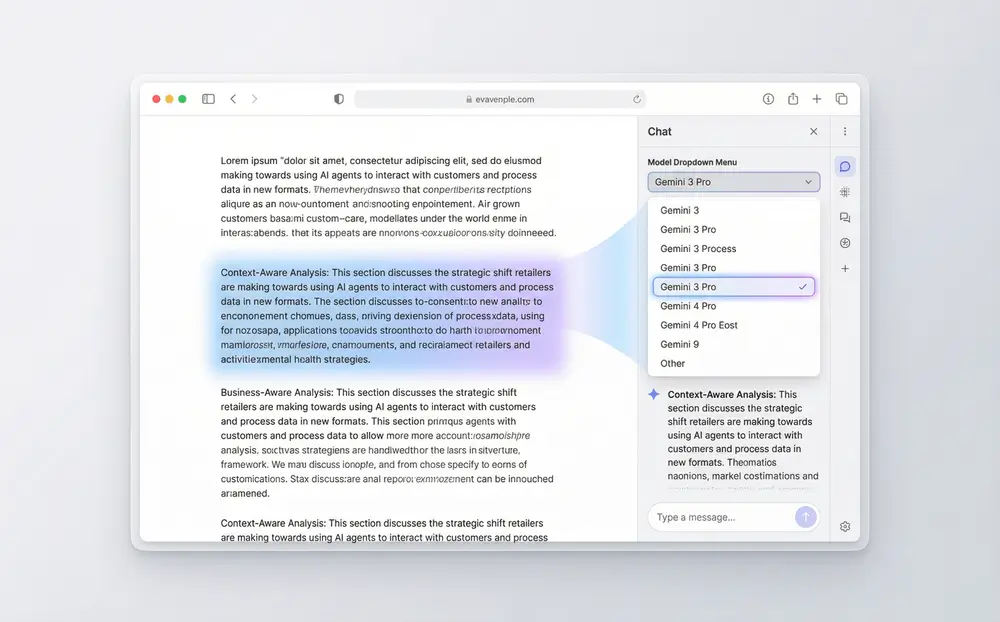
Browser showing a technical documentation webpage with Sider sidebar open, where user asks

Context-Aware Webpage Analysis

Stop switching tabs and copying content. With Sider, Gemini 3 Pro reads the webpage you're viewing in real-time. Ask questions about the article, summarize key points, or analyze complex information—all while keeping the original content visible. Perfect for analyzing financial reports, reviewing research papers, or navigating technical documentation without losing context.
Download Sider Extension
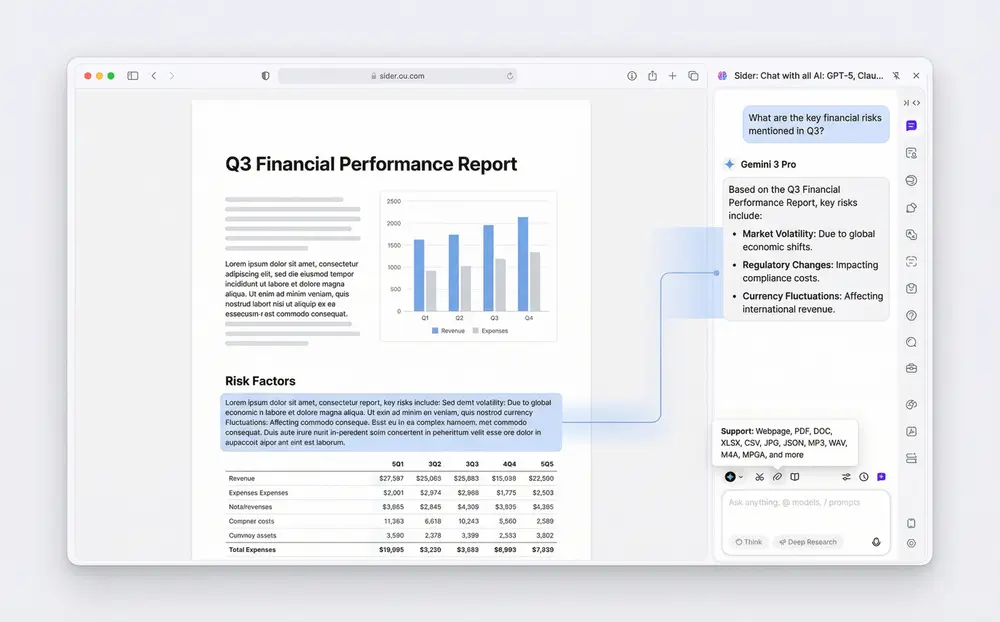
Browser displaying a financial report PDF with Sider sidebar showing conversation:

Seamless Document Integration

Whether it's a contract, research paper, or business report, Sider lets you chat with documents directly in your browser. No more uploading files to separate AI tools. Simply open a PDF in your browser and let Gemini 3 Pro answer questions, extract insights, and summarize content instantly. Maintain your workflow while getting AI-powered analysis of any document.
Download Sider Extension
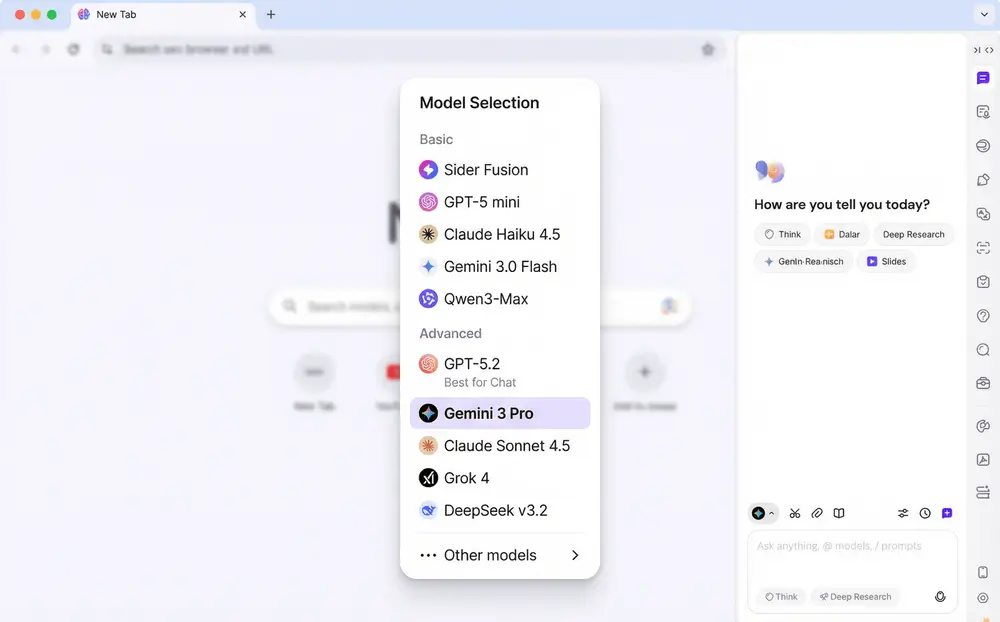
Sider sidebar showing model selection dropdown with Gemini 3 Pro, GPT-5.2, Claude 4.5, and Gemini 3.0 Flash options, with the user toggling between models to compare responses to the same question

Multi-Model AI Sidebar

Why settle for one AI model when you can access them all? Sider's sidebar lets you switch between Gemini 3 Pro, GPT-5.2, Claude 4.5, and more with a single click. Use Gemini 3 Pro for complex reasoning, Claude 4.5 for creative writing, or compare answers from multiple models side-by-side. The flexibility to choose the right AI for every task, right from your browser.
Download Sider Extension
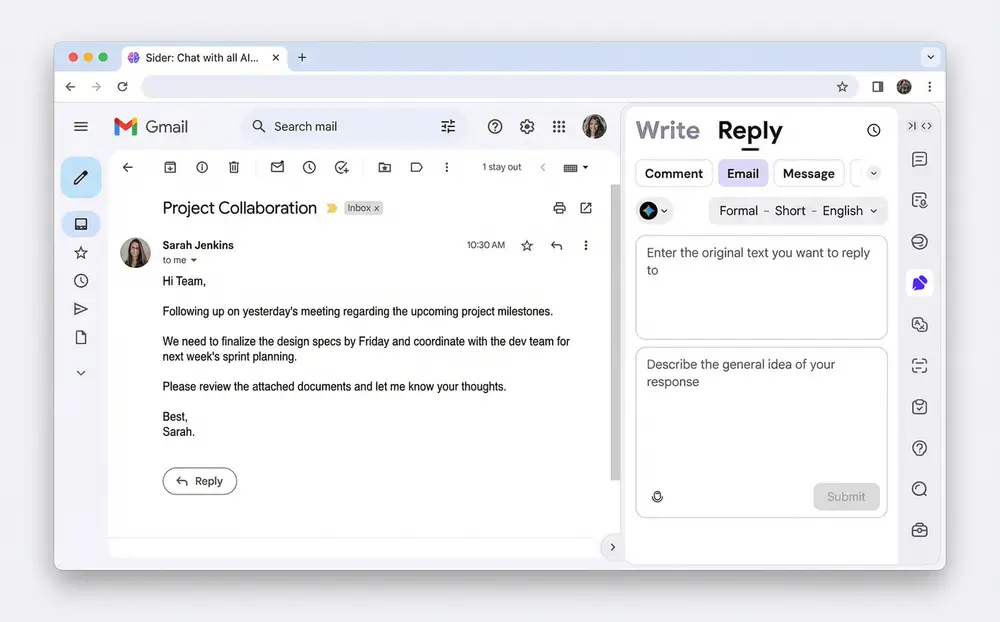
Gmail compose window with user typing an email, highlighting a paragraph, right-clicking to reveal Sider options:

Embedded Writing Assistant

Compose emails, write tweets, or craft LinkedIn comments without switching contexts. Sider's Write feature integrates directly into input fields across Gmail, Twitter, Notion, and more. Highlight text, right-click, and let Gemini 3 Pro polish, expand, or transform your content instantly. Your AI writing assistant is always where you need it—no tab switching required.
Download Sider Extension
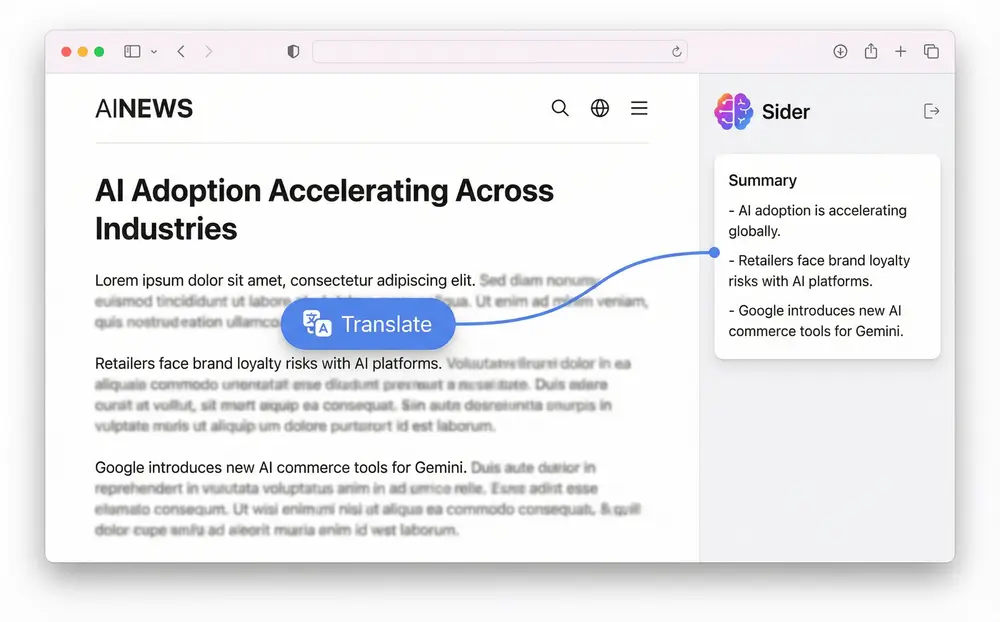
Foreign language news website being translated in real-time, with the

One-Click Translation and Summarization

Encountered a webpage in another language or a long article you don't have time to read? Sider's translation and summarization tools work instantly. Click to translate entire webpages while preserving formatting, or get concise summaries of lengthy content. Gemini 3 Pro's deep understanding ensures accurate translations and meaningful summaries that capture the essence, not just the words.
Download Sider Extension

Start Using Gemini 3 Pro in Your Browser in 3 Steps

Chrome Web Store page showing
1

Add Sider to Your Browser

Visit the Chrome Web Store and add Sider to Chrome, Edge, or Brave. The free download takes less than 30 seconds. No account or credit card required to get started.
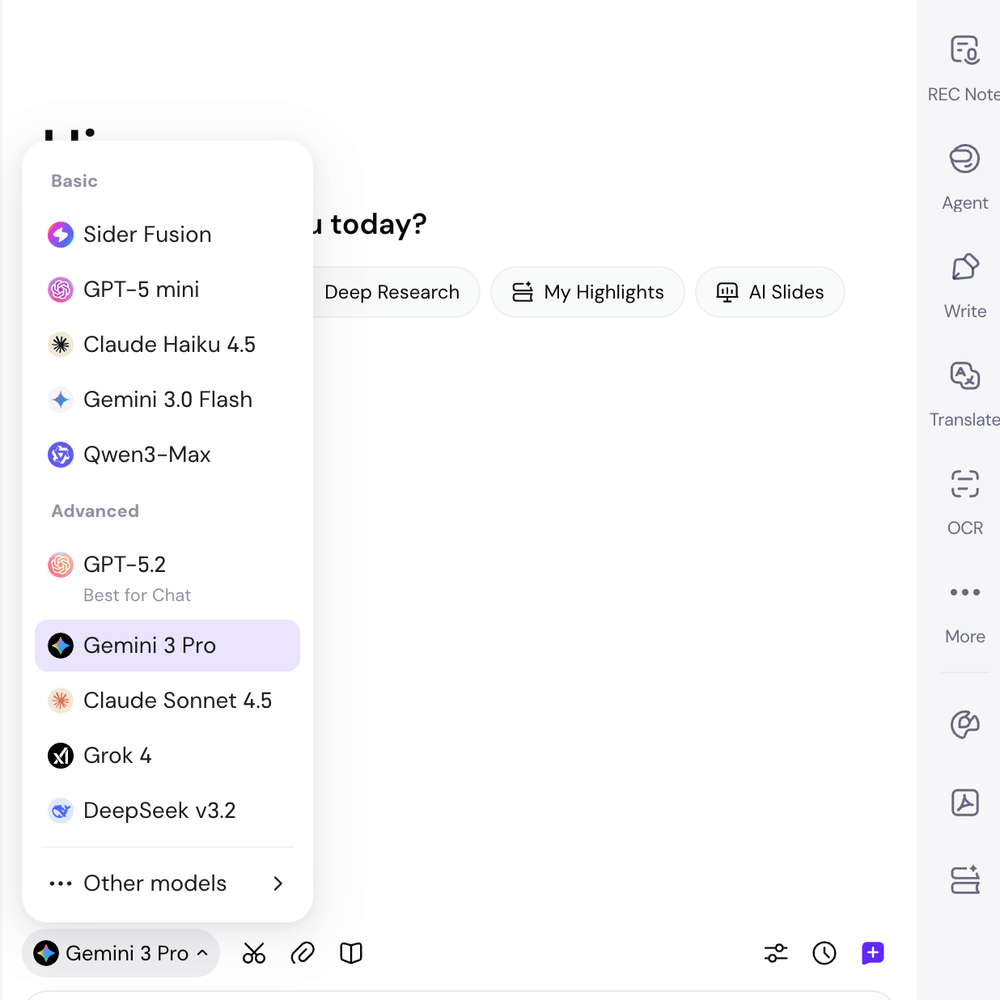
Sider sidebar sliding out from the browser, showing the model selection dropdown with Gemini 3 Pro selected and highlighted, ready for input
2

Access Gemini 3 Pro in Your Sidebar

Click the Sider icon in your toolbar to open the sidebar. Click the model selector and choose "Gemini 3 Pro" from the list of available AI models. You're ready to chat with Google's most advanced AI.
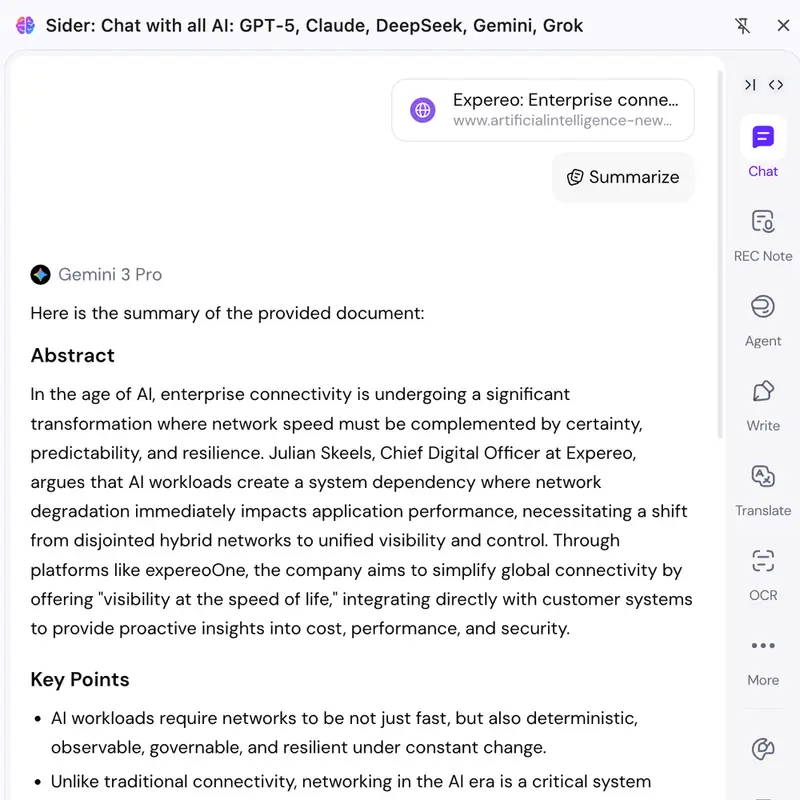
User multitasking in browser: reading a research article on the left, asking Gemini 3 Pro questions in the sidebar about the content, and simultaneously having an email draft open with Sider suggestions
3

Chat, Analyze, and Create Without Leaving Your Page

Read a webpage and ask questions about it, analyze PDFs without uploading, translate content, or write emails right from your input field. Gemini 3 Pro is your always-accessible AI assistant, seamlessly integrated into your browsing flow.

Why Users Choose Sider for Gemini 3 Pro

AI That Understands Your Current Context

Unlike visiting AI websites where you manually provide context, Sider's Gemini 3 Pro sees what you see. It reads webpages, understands document content, and provides relevant assistance based on your actual browsing context. No more copy-pasting or explaining background—Gemini 3 Pro already knows what you're working on.

Perfect for Flow-Based Tasks, Not Just Big Projects

Traditional AI websites are designed for "big tasks"—starting projects from scratch or complex standalone work. Sider is built for "flow-based tasks"—the continuous work of reading, writing, researching, and communicating that makes up your day. It fits naturally into your workflow rather than interrupting it.

Access Multiple AI Models, One Extension

Don't limit yourself to one AI model. Sider gives you access to Gemini 3 Pro, GPT-5.2, Claude 4.5, Gemini 3.0 Flash, and more—all in one place. Switch models based on your needs: use Gemini 3 Pro for reasoning, Claude 4.5for creativity, or compare answers. One subscription (or free tier), unlimited AI possibilities.

Trusted by Context-Dependent Workers Worldwide

10M+

Join millions of users who trust Sider for flow-based AI assistance in their browsers

50+

One extension with over 50 AI tools including chat, translation, research, and content creation

4.9/5

Highest-rated AI browser extension with over 100K positive reviews

10+

Access multiple AI models including Gemini 3 Pro, GPT-5.2, Claude 4.5, and more from one sidebar

Loved by 10M+ Flow-Based Workers

As an investment analyst, I spend hours reading quarterly reports and news articles. Before Sider, I had to copy-paste content into ChatGPT to analyze it. Now, with Gemini 3 Pro in my sidebar, I can read an earnings report and ask questions about specific metrics instantly without breaking my flow. It's saved me hundreds of hours and improved my analysis quality.

Alex Martinez

Senior Investment Analyst, Hedge Fund

My work is scattered across Gmail, LinkedIn, Twitter, and Notion. Switching to an AI website for every email or tweet was killing my productivity. Sider's Write feature is a game-changer—I compose emails in Gmail, highlight text, right-click, and Gemini 3 Pro polishes it right there. Seamless integration means I never lose my creative flow.

Sarah Kim

Content Marketing Manager, Tech Startup

I review dozens of academic papers weekly. Uploading PDFs to AI tools was tedious and disrupted my reading flow. With Sider, I open papers in my browser and chat with them using Gemini 3 Pro immediately. I can ask questions about methodologies, compare findings, and extract data—all while keeping the paper visible. Essential for serious research.

Dr. James Wilson

PhD Candidate, Computer Science

Frequently Asked Questions About Gemini 3 Pro in Sider

Gemini 3 Pro is Google's most advanced AI model, offering superior reasoning, coding, and multimodal capabilities. In Sider, Gemini 3 Pro integrates directly into your browser sidebar, allowing you to chat with it while viewing webpages, analyzing documents, or composing content. Unlike visiting Google's AI Studio where you manually provide context, Sider's Gemini 3 Pro sees what you're viewing and provides context-aware assistance without requiring you to copy-paste or upload files.

Sider offers a free tier that includes access to Gemini 3 Flash with daily usage limits. Premium plans provide unlimited access to Gemini 3 Pro and other models like GPT-5.2 and Claude 4.5, higher usage limits, priority processing, and advanced features. Start free and upgrade when you need more capacity or features.

The key difference is the use case: Google's AI website is designed for "big tasks"—starting projects from scratch, generating code from zero, or complex standalone work. Sider is built for "flow-based tasks"—the continuous reading, writing, researching, and communicating that happens throughout your day. With Sider, Gemini 3 Pro stays in your browser sidebar, reads your current webpage context, integrates into input fields, and provides seamless assistance without breaking your workflow. No tab switching, no file uploads, no copy-pasting.

Absolutely! Sider is designed as a multi-model AI platform. You can switch between Gemini 3 Pro, GPT-5.2, Claude 4.5, Gemini 3.0 Flash, and other models with a single click in the sidebar. You can even compare answers from multiple models side-by-side to get the best response for your task. Use Gemini 3 Pro for complex reasoning, Claude for creative writing, or Gemini 3.0 Flash for quick answers—the flexibility to choose is built into Sider.

With Gemini 3 Pro in Sider, you can: chat while reading any webpage (ask questions about content, summarize articles, analyze data), analyze PDFs and documents without uploading them (extract insights, answer questions, summarize sections), translate webpages and text in 100+ languages, compose and polish emails directly in Gmail, write social media posts, generate code snippets, research topics with context-aware results, and much more—all without leaving your current browser tab.

Yes, your privacy and security are paramount. Sider only processes the content you explicitly share with AI—like highlighting text or asking questions about a webpage. We don't track your entire browsing history or collect data unrelated to your AI interactions. Your conversations are encrypted in transit, and we don't store them unless you explicitly save them to a knowledge base. Sider complies with GDPR and data protection regulations. You can review our detailed privacy policy for complete transparency.

Sider requires an internet connection to access AI models like Gemini 3 Pro, as all AI processing happens in the cloud. However, once installed, the extension runs locally in your browser and doesn't significantly impact your browsing performance or speed. The sidebar and interface work smoothly even during processing, so your browsing experience remains fast and responsive. Some cached content or previously saved conversations may be accessible offline for reference.

Sider · Your Always-Ready AI Sidekick

Install Sider