AI Mind Map Maker - Multi-Language & PDF Support

Transform PDFs, notes, and web pages into structured visual mind maps. Export as PNG or XMind. Works with AI mind map generator in Chrome & Edge.

Create Mind Map
10M+ Active users
50+ Languages
4.9/5 User ratings

AI Mind Map Generator Features

PDF document being converted to structured mind map diagram

From PDF to Mind Map

Upload PDF documents directly and let AI extract and structure the content into visual mind maps. This works for academic papers, research articles, and business reports. The AI mind map maker from PDF reads any document and creates accurate hierarchies with concise node labels.
Download Sider Extension
Text input being transformed into colorful mind map structure

Text to Mind Map

Transform notes, brainstorm ideas, or rough outlines into organized visual structures. Simply paste your text. The AI creates logical hierarchies with main topics, sub-topics, and supporting details automatically.
Download Sider Extension
Mind map showing multi-language support interface

Multi-Language Mind Maps

Read documents in one language and generate mind maps in another. This AI mind map maker supports translation between languages, making content accessible regardless of the source language. This is useful for international teams and multilingual research.
Download Sider Extension
Webpage being analyzed and converted into mind map format

Web Page to Mind Map

Open any webpage and let AI analyze the content to create structured mind maps. Extract key concepts, action items, and core ideas from web articles, blog posts, or research papers. This helps researchers and content creators organize online resources.
Download Sider Extension

How to Create Mind Maps with AI

Sider browser sidebar showing artifacts tool location
1

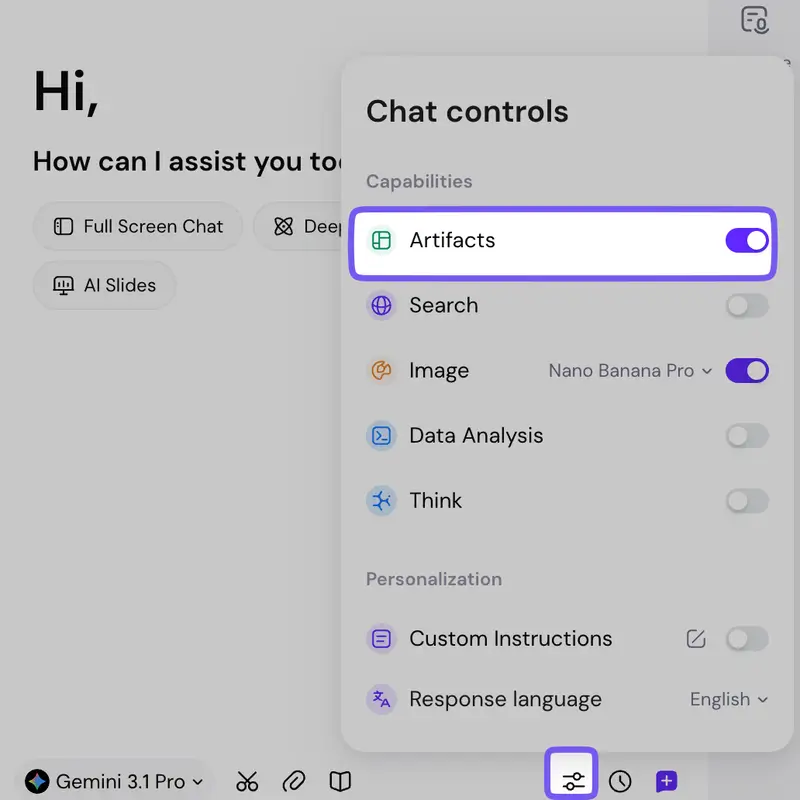
Open Artifacts Tool

Install Sider extension on Chrome or Edge, then click the sidebar icon to access AI tools. Open the artifacts tool from the chat control interface to start creating mind maps.

Input options showing text paste, PDF upload, and webpage reading
2

Input Your Content

Choose how to provide content: paste text directly, upload a PDF document, or let AI read the current webpage. The AI mind map maker accepts multiple input formats for flexible workflow.
Generated mind map with export options displayed
3

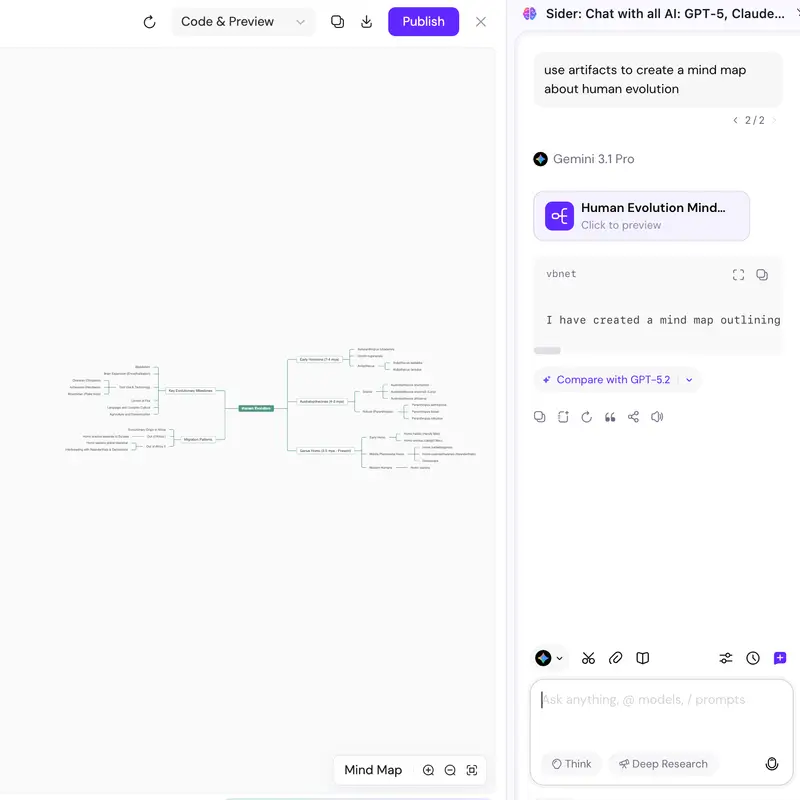
Generate & Export

AI creates a structured mind map with accurate hierarchies and concise labels. Refine nodes with prompts if needed, then export as PNG for presentations or XMind for further editing in specialized tools.

Why Choose AI Mind Map Maker

Accurate AI Structure

The AI mind map generator creates logical hierarchies with precise main topics, sub-topics, and supporting details. Unlike flat lists, mind maps show relationships and dependencies clearly.

Flexible Input Options

Support for text input, PDF upload, and webpage reading. Work with documents directly without copying or manual formatting. The mind map maker with AI handles any content format.

Export & Share

Download mind maps as high-quality PNG images for presentations or export as XMind files for professional editing tools. Share with teams easily in your preferred format.

By the Numbers

10M+ users

Chrome Web Store extension

50+ languages

Languages supported

4.9/5 stars

Average user rating

PNG & XMind

Export formats available

What Users Say

I needed to digest hundreds of academic papers for my PhD. This AI mind map maker changed my workflow. I paste PDF content and get structured visual summaries that help me understand complex arguments quickly.

Sarah Chen

Graduate Student, UC Berkeley

Our team spent hours organizing meeting notes into action items. Now we paste notes into Sider and get instant mind maps. The hierarchy makes project dependencies clear for everyone.

Michael Torres

Project Manager, Tech Startup

I create content for YouTube and needed a better way to structure scripts. The text to mind map feature turns my rough ideas into organized outlines. It saves me hours every week.

Emily Park

Content Creator

Frequently Asked Questions

A mind map is a visual diagram that organizes information around a central concept. It uses branches to connect related ideas, showing relationships and hierarchies. Mind maps help with brainstorming, studying, planning, and organizing complex information visually.

With Sider AI Mind Map Maker, simply open the artifacts tool in your browser sidebar. You can paste text, upload a PDF, or let AI read the current webpage. The AI automatically structures your content into a clear mind map with accurate hierarchies.

Yes, the AI mind map maker reads PDF files directly. Upload any PDF document and AI will extract the content and structure it into a visual mind map. This works for academic papers, business reports, and any PDF document.

Yes. Simply type or paste your notes, brainstorm ideas, or outline. AI will transform your text into a structured mind map with logical hierarchies and concise node labels.

Yes, export your mind maps in two formats: PNG image for presentations and documents, or XMind format for importing into specialized tools like XMind, Notion, or Obsidian.

Yes, the AI mind map maker supports multi-language input and output. You can read documents in one language and generate mind maps in another, making it accessible for diverse users.

Sider AI Mind Map Maker works as a browser extension on Chrome and Edge. Install the extension to access mind map creation and other AI tools directly from your browser sidebar.

Start Creating Mind Maps with AI

Transform your documents, notes, and ideas into structured visual mind maps directly in your browser.

Create Mind Map Now