- Home
- What's New
- Browser Extension
- Netflix Bilingual Subtitles & Expanded API Support
Netflix Bilingual Subtitles & Expanded API Support
Sider v4.42.0
netflix subtitles
Feb 21, 2025Version: 4.42.0
The latest Sider update is here, and it's packed with exciting features to make your experience more flexible, powerful, and enjoyable!
Netflix Dual Subtitles: Learn While You Watch!
Watching Netflix just got better! You can now enjoy bilingual subtitles on Netflix videos (when subtitles are available for the content).
This feature is perfect for:
- Language learners looking to improve comprehension
- International viewers who want both native and translated subtitles
- Anyone seeking a better understanding of foreign content
-1739935518482.png)
How to use Netflix Dual Subtitles
- Play any Netflix video with subtitles enabled
- Toggle on the Bilingual subtitles of Sider
- Select your preferred language (via the three-dot icon)
Multi-API Support: Use Your Own API
Sider has three existing modes:

1. Sider (Recommended):
- Full access to all features
- Multiple model support
- Optimized performance
- Zero configuration needed
2. Custom API Key:
- Use your own API key to avoid Sider fees
- Limited to models supported by your API
3. ChatGPT Webapp:
- Accessible with just a ChatGPT account login
- Less stable and limited to supported models
What's New?
Previously, the Custom API Key mode only supported OpenAI's API. With this update, Sider now supports multiple AI APIs, including OpenAI, DeepSeek,Groq, and Google.
-1739950175357.png)
What this means for you:
- Use many of Sider's core features for free with your own API key (e.g., Chat, Write, Ask, Context Menu).
- Some features, like YouTube Summary, and Translate, remain exclusive to Sider Mode.
- Easily switch between Sider Mode and your own API for greater flexibility.
How to use your own API key:
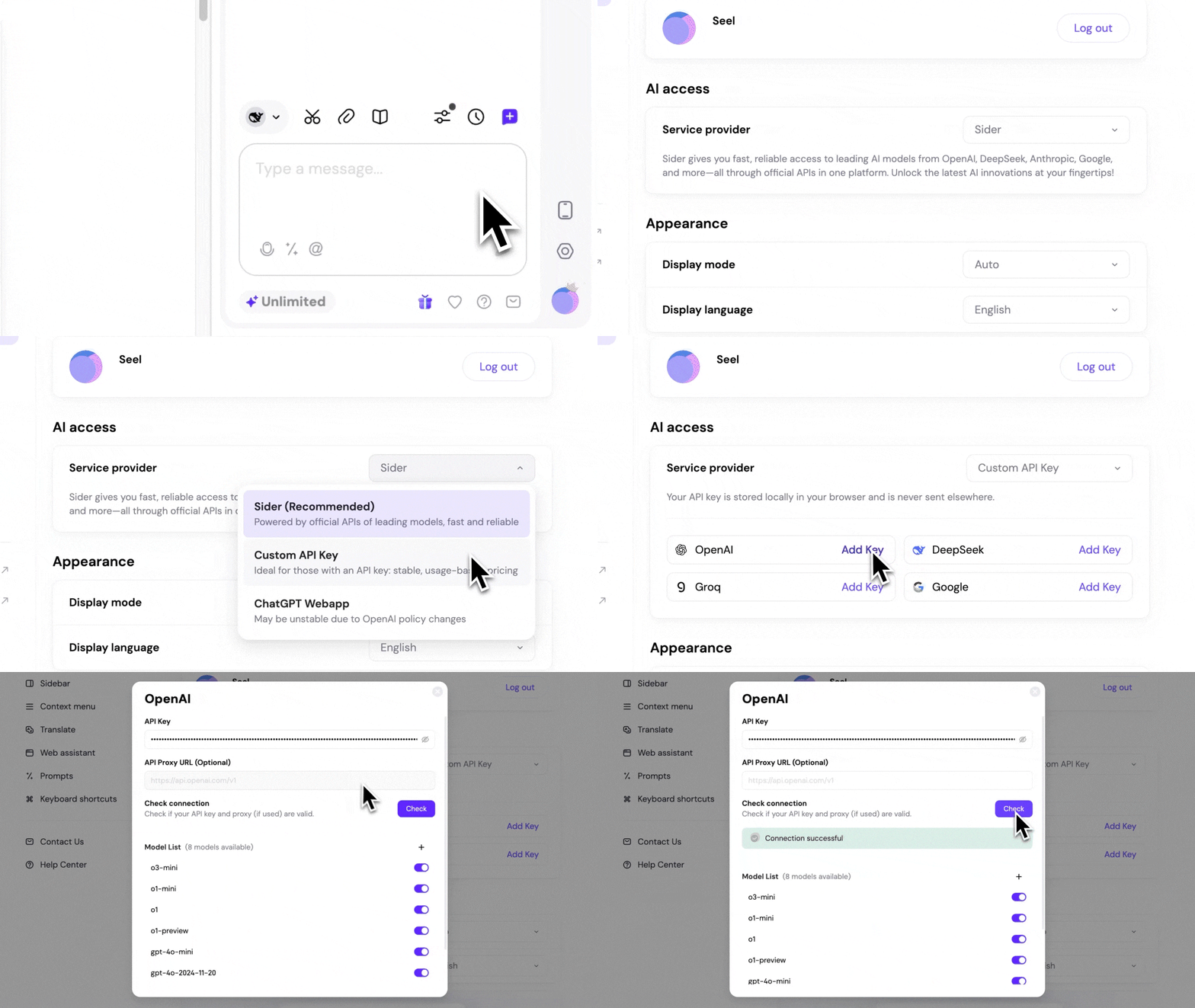
- Go to Sider extension Options> General > AI Access
- Select Custom API Key as your service provider
- Choose your preferred API provider from OpenAI, DeepSeek, Groq, and Google
- Enter your API key and click Check
Update Information
✅ Current Users: You've already received the update automatically!
We're constantly working to make Sider better for you. If you have any feedback or suggestions, we'd love to hear from you!